Before a bid invitation goes out, somebody at the general contractor's office opens your site and checks it against a short list. This guide walks through that list for an electrical subcontractor in Florida: which license the state recognizes, what to show, which pages to build and how to describe your work so an estimator understands it in one read. SENAVIA, a web design agency in Plantation, builds sites for trade companies. This is a practical guide, not legal advice.
What does a general contractor check on an electrical subcontractor's website?
A general contractor (GC) usually looks for a license it can verify, a certificate of insurance (COI), the kinds of work you take, the counties you cover and the size of your crew. Electrical licensing sits with the Electrical Contractors' Licensing Board (ECLB) of the DBPR, so that is where a careful GC confirms the first item.
Think of the site as an answer sheet. When the estimator finds the license, the types of work and the counties in a single visit, the next step is more likely a bid invitation than an email asking for them. Where the number goes and what to publish about insurance is covered in our guide to the license and insurance rules for contractor sites; this article adds what is specific to electrical work.
- License: the number, the category and the places where it is valid.
- Insurance: a note that the COI is sent on request.
- Types of work: commercial, residential and service work, each on its own page.
- Counties: the ones you actually cover, named one by one.
- Crew: how you staff a job, described in words rather than a headcount.
A city page shows the same logic in practice. SENAVIA's Coral Gables page already answers what an electrical sub in that city should put in front of a GC, so this guide goes deeper into the trade instead of repeating it. If most of your jobs sit near Miami Lakes, the Miami Lakes page shows how a local area is described. The broader picture for every trade is on our page about websites for subcontractors.
What license does an electrical contractor need in Florida, and how is it shown?
Florida licenses electrical contractors at the state level through the ECLB. According to its DBPR page, a certified license is statewide, while a registered electrical contractor may contract only in the cities or counties named on the registration.
The same board page lists the categories: electrical contractor, alarm system contractor, specialty contractor (low voltage, residential work and signs, among others) and a registered version of several of them. It adds that a registered electrical contractor may not contract for any alarm system. Your site should state the category you hold, because it tells a GC which scope fits your license.
To show it, put the license number and category in the footer of every page, repeat them on a license and insurance page, and point to the state's Verify a License tool so the GC can confirm it without calling you. The advertising rule behind the placement, and what changes by county, is in the license and insurance guide.
If you hold a registration, list the cities or counties it covers instead of writing "serving all of Florida." A statewide claim over a local registration invites a second look, and the second look is the one you do not want.
Which pages does an electrical subcontractor website need?
Start with the pages below and add more as the work calls for them. Each page should answer one question without sending the reader somewhere else.
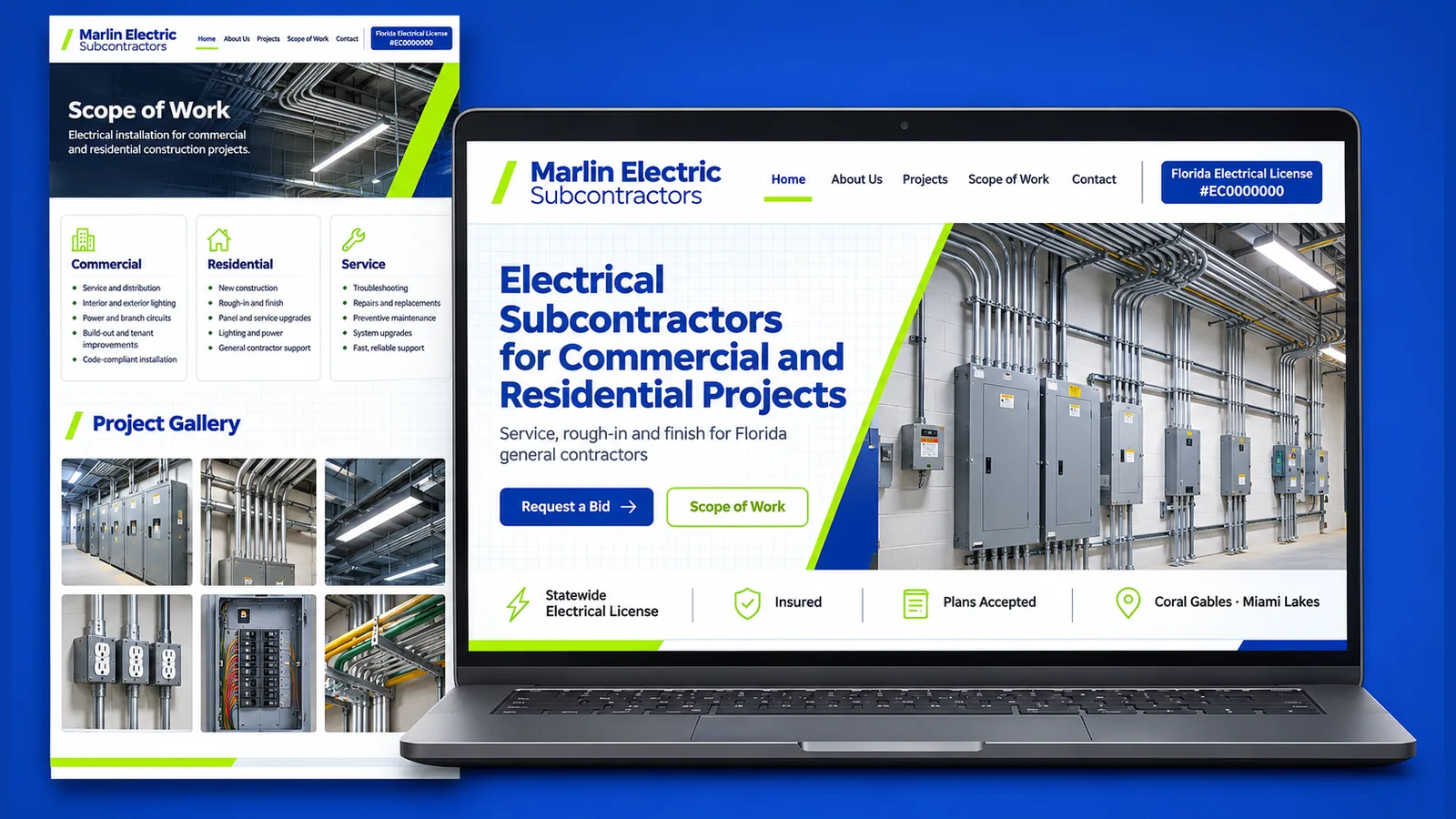
- Home: your trade, your counties, the license number in the footer and a button to request a bid.
- One page per type of work: commercial, residential and service, each with its own description and photos.
- Gallery: finished jobs sorted by type, built as described in project photos that win bids.
- License and insurance: number, category, where it is valid, the COI on request and the verification link.
- Bid request form: it takes the plans, the due date and a contact, and sends them to your estimator.
- Spanish: the same pages for the crews and contractors who read Spanish.
The form deserves the most care. An estimator who receives plans from a phone, with the due date and the right contact attached, tends to reply sooner than one who has to chase them. A form that rejects a large drawing set can send the GC to the next sub on the list.
Which of these pages is your current site missing? Book a free 30-minute call to review it page by page with SENAVIA.
How do you explain your scope without technical language?
Write one line an estimator can read in a few seconds: the kind of work, the size of the jobs in plain words, whether you build from plans and which other trades you work next to. Technical detail belongs in the bid, not on the page.
- Kind of work: "Commercial build-outs for offices and retail spaces."
- Size, by description: "Single-tenant spaces and small buildings" or "complete houses," with no figure that you would have to defend.
- Plans: "We bid from plans and answer addenda."
- Other trades: "We coordinate with the framing, air conditioning and drywall crews."
Keep the audiences apart. A homeowner who needs a service call reads differently from an estimator comparing three subs, so give residential service its own page and its own phone button, and keep the commercial page focused on plans, schedule and coordination. Leave out words such as "quality" and "reliable" unless a photo or a license number backs them up; an estimator tends to skim past them.
One more detail: bid, GC and COI are the words your contacts already use, so they stay in English even on a Spanish page, with a short explanation beside them the first time they appear.
How much does an electrical subcontractor website cost, and how long does it take?
Prices on the SENAVIA pricing page start at $650 for a Landing Page delivered in 1 month. Corporate Business begins at $1,750 and 2 months, Lead Generation at $3,750 and 3 months. The portal level, where crew leads log in, begins at $9,475; plan on 3.5 months.
A company that needs the pages above in English fits Corporate Business, and a bilingual site is listed there as an add-on, so ask for it in the quote. A one-crew company that only needs a proof page for its license and photos may start with the Landing Page. A portal matters later, once crew leads need to log in. Your own quote is set by the trades, counties and languages you list.
The line-by-line comparison is in our guide to what a subcontractor site costs around South Florida, and the pages themselves belong to SENAVIA's business website design service.
If your crew reads Spanish and your estimators read English, the two-language setup is covered in our guide to a bilingual contractor website.
The electrical trade shares this series with three others: what a roofer’s site needs, HVAC subcontractor site, step by step and the drywall and painting version of this guide. License, insurance and photo rules repeat; the pages change with the trade.
What do electrical contractors ask before ordering a website?
Should the site list every license category the company holds?
List the ones you hold and bid under. The DBPR electrical page separates electrical, alarm system and specialty categories, and a GC reading your site usually wants the category that matches the job, not a list of everything the board offers.
Does a registered license change what the site says?
Yes. A registration is tied to the cities or counties named on it, as the board page explains, so the site should name those places instead of claiming the whole state.
Is a Spanish version worth it for a company that works with crews?
It is worth considering when your foremen, your helpers or your homeowner customers read Spanish more comfortably than English. The trade terms your contacts use with the GC stay in English, and the rest of the page is written in the Spanish spoken in Florida.
To hear how your site reads to an estimator, book a free 30-minute call; the wider approach for trade companies is described in subcontractor website design for electrical companies.