Estimators usually spend little time on each company, and a clear summary of what you do, where you work and what you carry can decide whether your name stays on the bid list. In the trade that summary is called a subcontractor capability statement. This guide covers what goes on it for a Florida construction sub, how to publish it as a web page and as a PDF, and how to keep it current.
What is a subcontractor capability statement, and who asks for it?
A subcontractor capability statement is a short document that tells a buyer what your company does and can handle: trades, counties, crew, equipment, past work and paperwork. General contractors (GCs), estimators and some public owners can ask for one when they build a bid list or set up a new vendor.
It can arrive as a request in an email, as a line in a prequalification form or as a field on a bidding platform. The same document should answer all three, so you write it once and reuse it instead of rebuilding it every time someone asks.
In Spanish we call it a “hoja de capacidades”, but the English name is the one a GC usually recognizes. If your office works in both languages, keep “capability statement” in the file name and the page title, and put the Spanish version next to it.
It is not your home page. The home page introduces the company to anyone; the capability statement is the reference sheet an estimator opens when the question is narrow, such as whether you cover Broward, whether you self-perform the work or who to call about a bid. The questions it has to settle are in our prequalification checklist from the GC’s side.
What sections does a capability statement include?
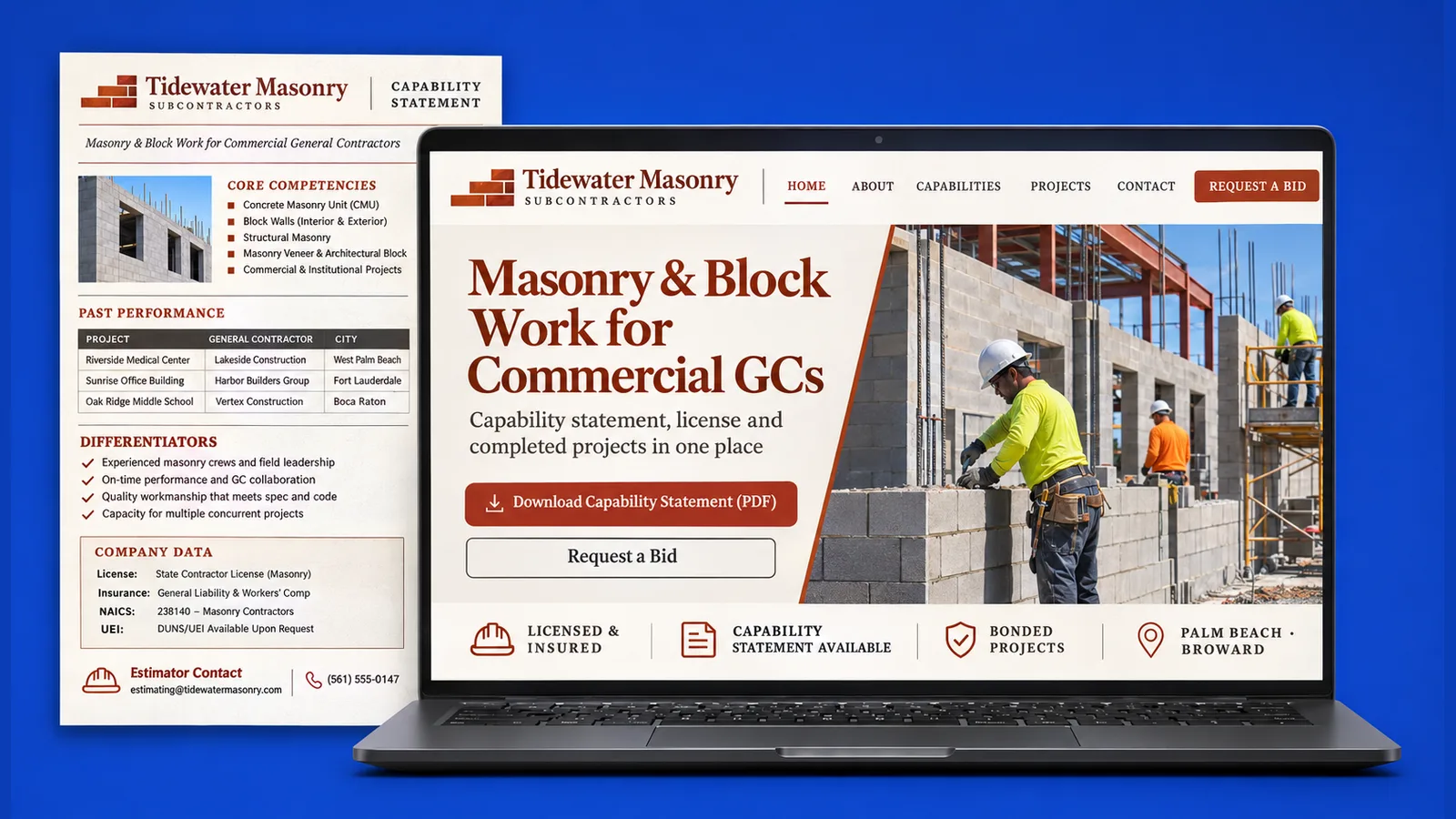
Use the same order every time so the reader knows where to look: company data first, then scope, then proof, then the person to call. These are the sections we put on a sub’s sheet.
- Company data: legal name, the name you trade under, address, phone, the license number and the insurance you carry.
- Trades and scope: what you install or build, what you self-perform and what you leave to others.
- Counties served: each county, with the main cities if that helps.
- Crew and equipment: how your crews are organized and what equipment you own.
- Representative projects: project type, the GC and the city, with a line on your scope.
- NAICS codes: the codes that match your trades.
- Bonding and EMR: only if you have them.
- Bid contact: the estimator’s name, direct phone and email.
Two of those lines need a plain definition. A bond is a guarantee from a surety company that you will finish a job or pay your suppliers; if you have bonding capacity, name the surety and ask it how it prefers the line to be worded. The EMR, or experience modification rate, is a rating that insurers use to reflect a company’s claims history. If you have one, copy it as your carrier reports it and change it when it changes. If you have neither, leave the line out instead of writing “N/A”.
NAICS codes are the industry classification numbers that forms and registries use to sort companies by type of work. Look up the ones that fit your trades and copy them exactly; guessing a code creates a mismatch the GC’s office has to sort out.
The license and insurance line deserves care, because it is usually the first line anyone checks. Which license to show, and how to describe coverage without posting a certificate that expires, is covered in license number and insurance on a Florida contractor website.
For projects, a name and a city are more useful than an adjective. Our guide to project photos that win bids covers captions. Ask the GC before naming it, and leave the name off if the answer is no.
Want yours reviewed against this list? Book a free 30-minute call and we will check it together, section by section.
Should it be a web page, a PDF or both?
Both, with the same information and the same date on each. The web page is what search engines and anyone typing your company name can find. The PDF is what an estimator attaches to an email or drops into a prequalification folder.
Build the page as real text, not as a picture of a document. Text can be read on a phone from a job site and found by search. Give the page its own plain address and let search engines index it.
Put a download link for the PDF on that page, near the top. Keep the PDF to a single sheet where you can, name the file with your company name and “capability statement”, and make sure it opens quickly on a phone.
The two versions drift apart easily, so generate them from the same text. If you change the page and forget the PDF, the estimator may download the older one. This is part of how we build the page when we design a business website for a trade company in Hollywood, Boca Raton or nearby. See our pages for Hollywood, Florida and Boca Raton, Florida.
Our page on websites for Florida subcontractors shows where the statement sits among the other pieces a GC looks for.
How does an estimator find your capability statement?
Put it where an estimator already looks: link it from your main subcontractor page, from the footer of every page, from your bidding-platform profile and from your Google Business Profile. Four different starting points should lead to the same statement.
The footer link matters most, because it follows the estimator from page to page. Label it “Capability statement”, not “Resources”.
On a platform profile, paste the web address of the page into the website field and upload the same PDF if the profile allows attachments. On the Google Business Profile, use the website link and add the statement’s address to the description or to a post if you want the file one click away.
How often do you update it, and who signs it?
Update it whenever a fact changes: a policy renews, a license status changes, you add a county or a trade, or a project wraps up. Someone with authority in the company, usually the owner or the qualifier, should review it, and the date shown should be the date of that review.
Name one person who owns the document. When three people can edit it, the phone number is right on the page and wrong on the PDF.
On the page, close with the name and title of the person who approved it and the review date. It is not meant as a legal signature; it tells the reader who stands behind the facts.
A stale statement can do more harm than a missing one. To put yours online and keep it current, book a free 30-minute call with SENAVIA.
Frequently asked questions
Does a newer company with few projects still need a capability statement?
Yes, and it can still be useful. Lead with your license, insurance, trades and the experience of the people who run the crews, and list the projects you have, even if they are few. An honest short sheet usually reads better than a padded one.
Can I send the PDF with a bid or only when someone asks?
Many subs attach it to the first message they send to a new GC and keep the page link in their email signature. If a GC’s instructions ask for specific documents, follow those instructions first and add the statement only when it fits.
Can one statement cover several trades?
It can, as long as each trade has its own line for scope and its own projects. If your trades go to different kinds of GCs, a separate page for each trade, linked from one main statement, is easier to read.